Creating voice content rarely happens in one place. Teams move between tools to translate scripts, adjust timing, and finalize audio. Translation often happens outside Studio, which means copying scripts, reformatting output, and repeating the process when content changes. Timing adjustments follow a similar pattern, with teams exporting audio and editing pauses after the fact to get the pacing right.
These extra steps slow production and introduce inconsistencies across versions.
New updates in WellSaid Studio address both issues directly. Translation brings multilingual workflows into a single environment. Pause control gives creators precise control over pacing within the project. Studio now supports more of the production workflow, from script to final audio.
The problem with today’s voice production workflows
Multilingual workflows break down across tools. Teams write in English, move to a translation tool, then bring the output back into Studio. From there, they review phrasing, fix formatting, and adjust delivery. When the source script changes, the process starts again. This creates delays and increases the chance of awkward phrasing or mispronunciations that affect the final output.
Timing and pacing create a different kind of friction. Creators rely on punctuation to approximate pauses or export audio into another tool to refine timing. Playback does not always reflect the final output, which leads to additional review cycles and manual fixes.
These gaps seem manageable at first, but they add up across teams and projects, slowing production and making consistency harder to maintain.
Translate projects directly inside Studio
.gif)
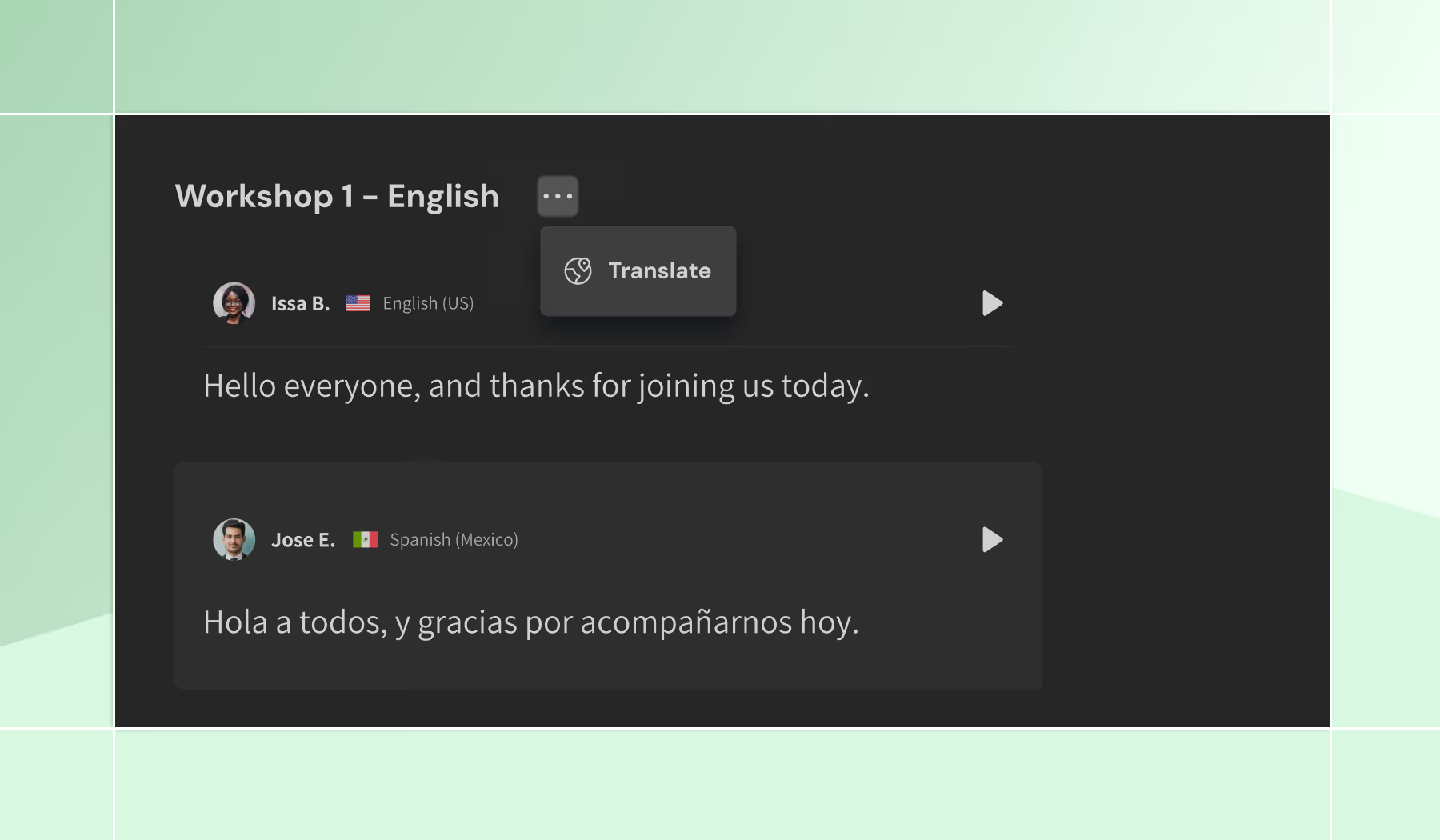
Translation now happens where your work already lives. Teams can translate English content into supported languages in a single action inside Studio. The translated version appears as a separate project, with structure, sections, and settings preserved. The source project stays unchanged, and each language version remains organized.
This removes a common source of friction:
- No switching between tools
- No copy and paste or reformatting
- No rechecking output across systems
Translations are generated with voice delivery in mind, which reduces the need for manual edits to improve phrasing or readability for audio.
Teams can create a single source script and generate multiple language versions in minutes. Each version can be:
- Reviewed independently
- Shared with the right stakeholders
- Exported on its own timeline
This is especially valuable for:
- L&D and compliance teams
- Global teams coordinating across regions
- Marketing teams and agencies localizing campaigns
Control pacing with pause between sections
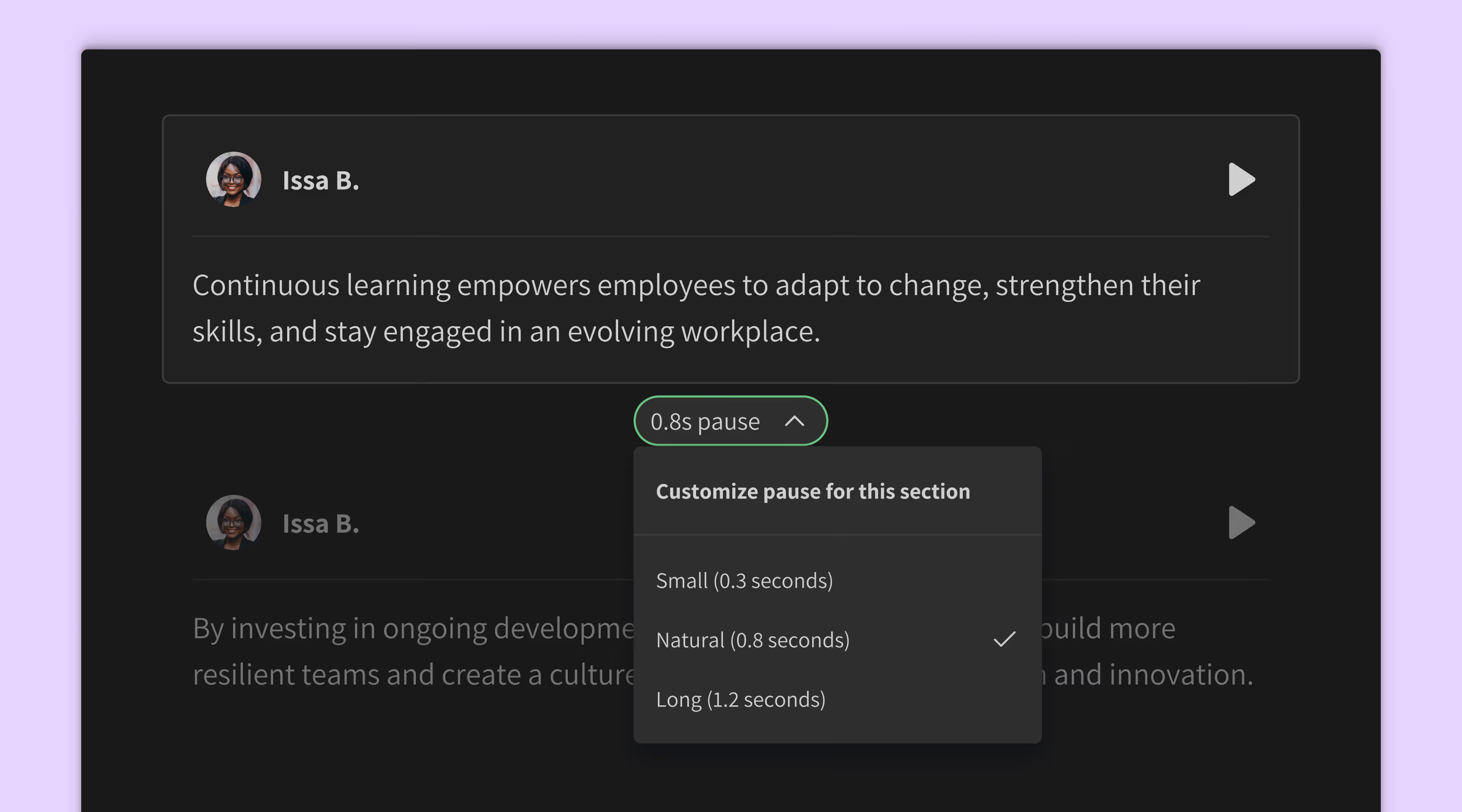
Pacing is now something you can control directly inside Studio. Creators can set pauses between sections without relying on workarounds or post-production edits. Pause controls appear between sections, with preset options or a custom duration up to 60 seconds. Changes apply immediately, and playback reflects them in real time.
Teams gain a more reliable way to shape delivery:
- No punctuation hacks to force timing
- No exporting audio to adjust spacing elsewhere
- Playback matches the final combined output
This level of control matters when timing carries meaning. Common use cases include:
- Training content that depends on clear pacing
- Video-aligned audio with exact timing requirements
- Long-form narration where rhythm supports flow
Pause control strengthens Studio as a production environment where teams can refine timing without leaving the project.
A more complete production workflow inside Studio
Translation and pause control address different parts of the process, but they point to the same shift. More of the workflow now happens inside Studio. Teams rely less on external tools, reduce manual steps, and gain more control within a single environment.
Teams can now:
- Create a script
- Translate it into multiple languages
- Refine pacing
- Export final audio
All within the same workflow, without breaking the process.
This changes how teams operate. Fewer handoffs reduce delays. Playback aligns with final output, which shortens review cycles. Projects stay organized, which improves consistency across versions.
As content volume grows, these efficiencies become more important. Keeping the workflow contained within Studio helps teams scale production without added complexity.
What this means for teams scaling voice content
As content volume increases, small inefficiencies start to compound. Extra steps that once felt manageable begin to create gaps across versions and slow production. Teams spend more time coordinating updates and reviewing outputs across tools.
These updates help teams move faster without sacrificing quality. Translation keeps multilingual content aligned from the start. Pause control keeps pacing consistent across outputs. Together, they make it easier to maintain consistency across languages and formats.
Production also becomes more predictable. Teams can rely on what they see and hear inside Studio, which reduces rework and keeps projects on track.
Move from fragmented workflows to end-to-end production
Studio now supports more of the real production workflow. Teams can create, translate, refine, and export without leaving the platform. This reduces switching, removes workarounds, and gives teams more control over how content is produced and delivered.
Try translation and pause controls in Studio. See how your workflow changes when everything happens in one place.


.jpg)
.jpg)